
Quick Start
WarHQ is a Windows companion app for Wargame Design Studio players. It discovers installed WDS titles, launches games from a single Library, and supports PBEM workflows through PBEM Box.
Use this page when you want the shortest reliable path from download to your first launched game or PBEM turn.
Before you start
Section titled “Before you start”You need:
- Windows 10 or newer.
- At least one installed Wargame Design Studio title.
- A default Windows email app if you plan to use PBEM Box to prepare outgoing mail drafts.
Install WarHQ
Section titled “Install WarHQ”- Download the WarHQ: Download WarHQ.
- Run the installer.
- Open WarHQ from the Start menu or desktop shortcut.
Success looks like the WarHQ Library opening without an error dialog.
Find your games
Section titled “Find your games”WarHQ discovers Wargame Design Studio games from your Windows registry. If a game is installed but missing from the Library, restart WarHQ after installing or updating the game.
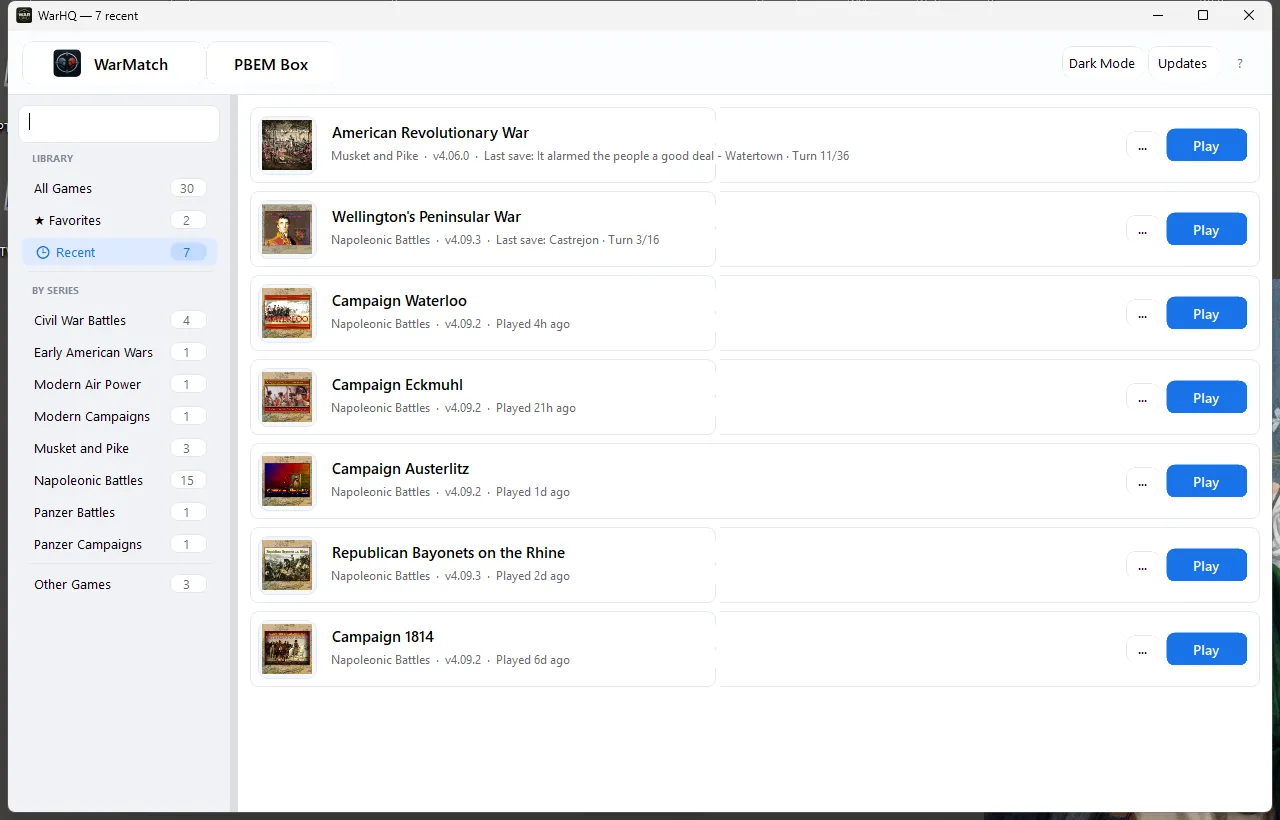
Success looks like your WDS series in the left sidebar and game rows in the main Library view.
Open a game
Section titled “Open a game”- Select a series in the sidebar.
- Search or scroll to the title you want.
- Use the launch button on the game row.
Choose your PBEM path
Section titled “Choose your PBEM path”| Goal | Use | Start here |
|---|---|---|
| Manage local save files and email turns yourself | PBEM Box | PBEM Box tutorial |
| Just launch and play installed WDS games | Library | Stay on this page |
First PBEM Box turn
Section titled “First PBEM Box turn”PBEM Box does not require signing in to a mail account inside WarHQ. It works with local turn files and asks Windows to open your default email app when it prepares an outgoing draft.
- Open PBEM Box from the Library toolbar.
- Click Import Turn, drag one received
.bteor.cpffile onto PBEM Box, or configure Preferences > PBEM to monitor the folder where attachments land. - Confirm the detected destination game and edit Copy to if the suggested filename is not what you want.
- Choose an existing opponent or create a new opponent when WarHQ asks.
- Click Import. If the target filename already exists, choose whether to overwrite it or go back and change the destination name.
- Open the game from PBEM Box, play your turn, save, and exit the WDS game.
- When WarHQ detects the completed turn, review the prepared email draft and attach the file by pasting from the clipboard or dragging it from the Explorer window WarHQ opened.
First five-minute checklist
Section titled “First five-minute checklist”- WarHQ opens from the Start menu or desktop shortcut.
- Your installed WDS titles appear in the Library.
- At least one game launches from WarHQ.
- PBEM Box opens and shows your local PBEM files if you use manual PBEM.
- Your PBEM watch folder opens the import workflow when a new
.bteor.cpffile arrives, if you enabled it. - WarHQ can open a draft in your default email app if you use PBEM Box outgoing mail help.
If something does not work
Section titled “If something does not work”| Problem | First thing to try |
|---|---|
| A WDS title is missing | Open that game once from its normal shortcut, close it, then restart WarHQ. |
| PBEM Box does not show a turn | Use Import Turn for files that were already in the folder before monitoring started. |
| Email drafts open in the wrong app | Check the default email app in Windows settings. WarHQ uses Windows mailto: handling. |
| An email draft has no attachment | Paste the copied turn file into the draft or drag it from the Explorer window. mailto: cannot attach files automatically. |
| You are not sure what to send support | Include your WarHQ version, Windows version, WDS game title, and the exact step that failed. |